NN Delta Force
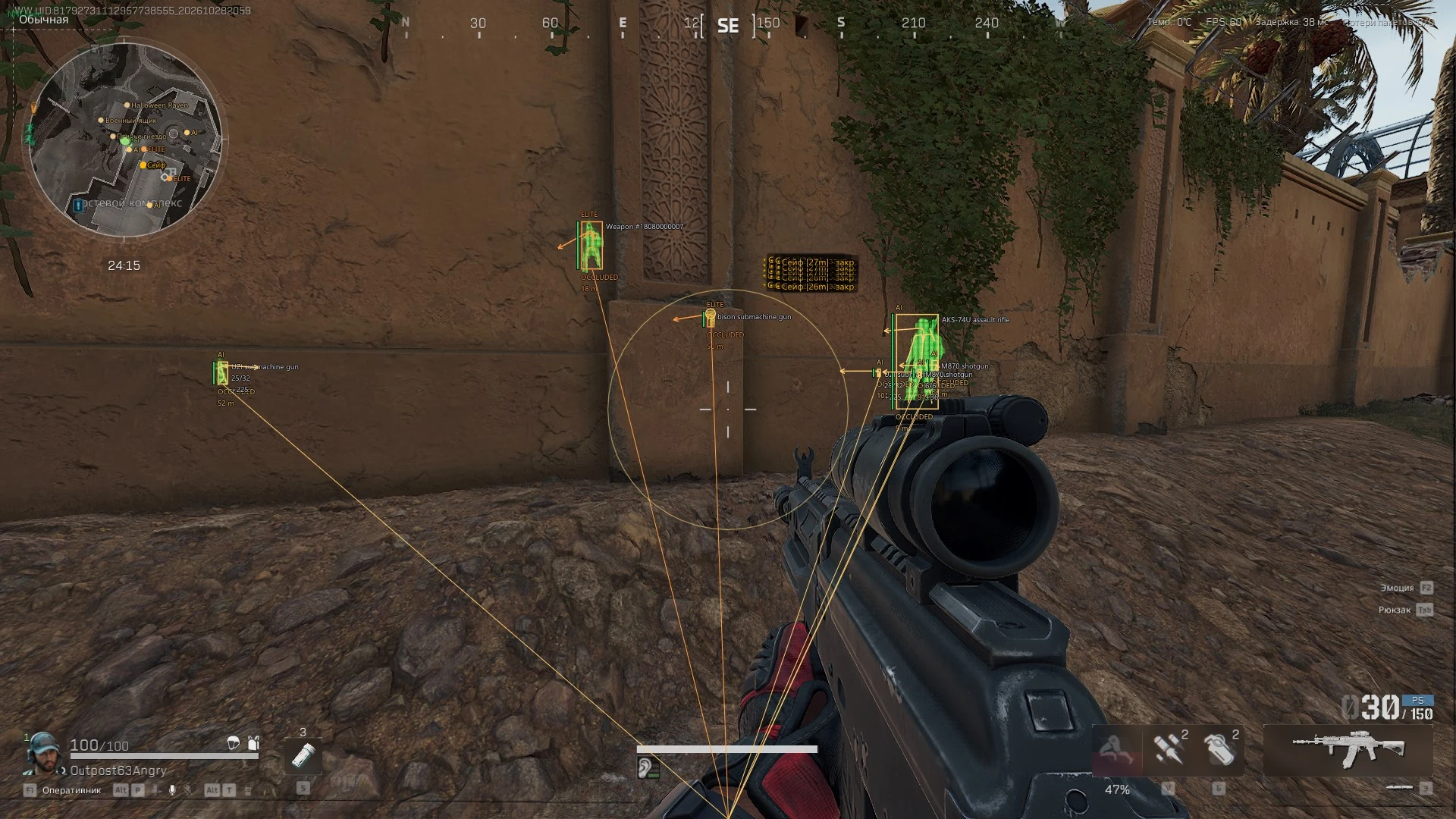
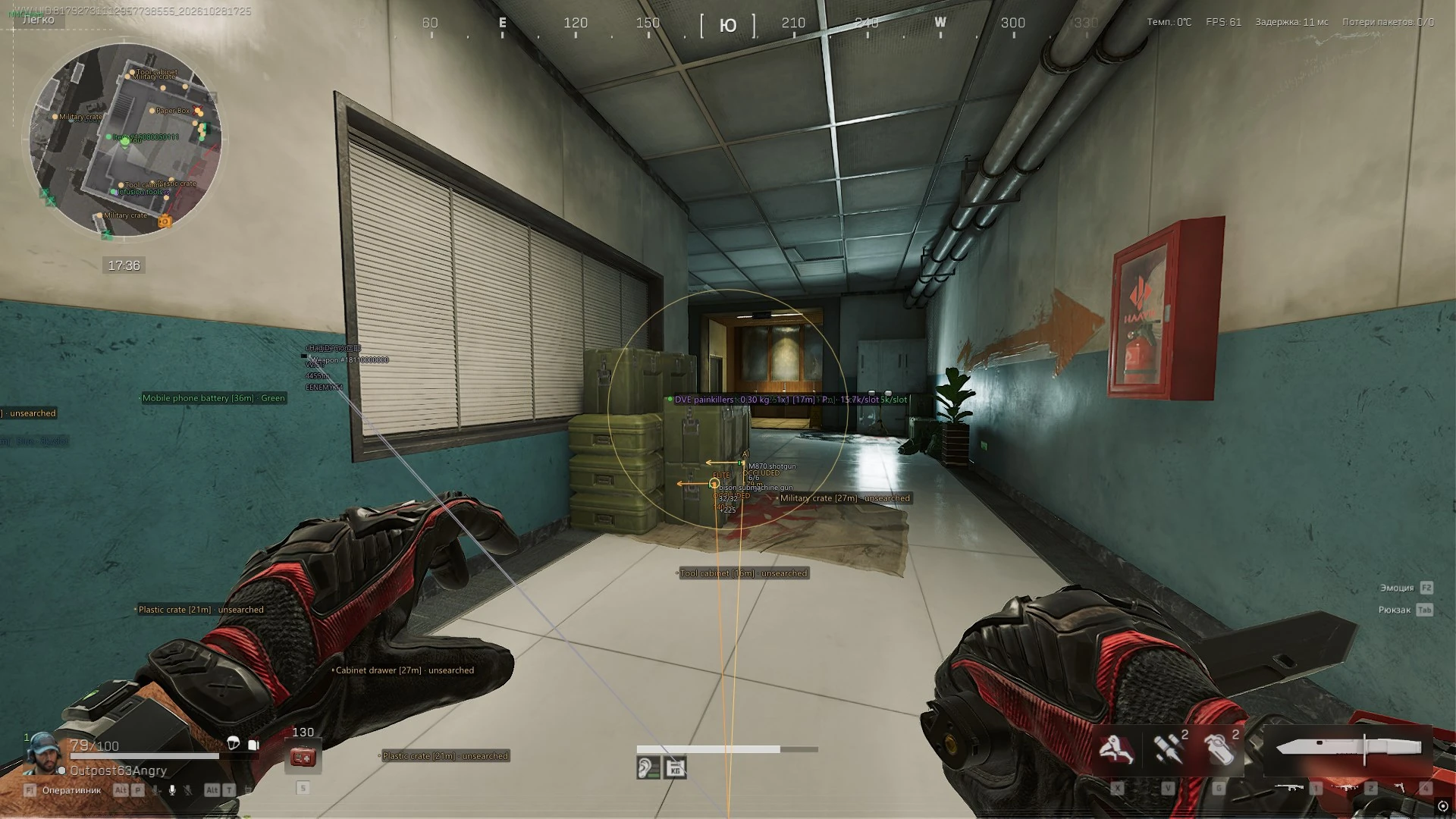
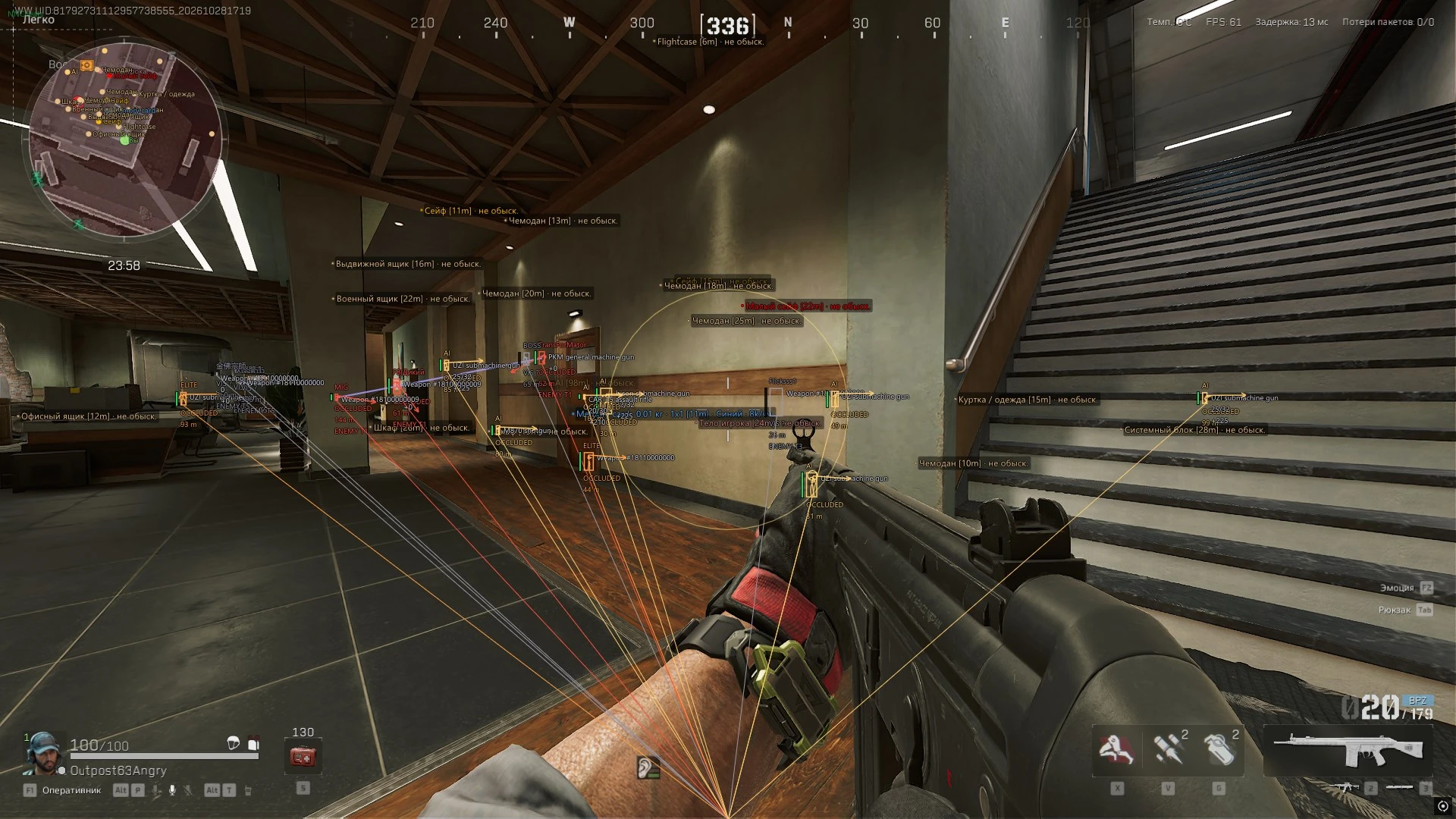
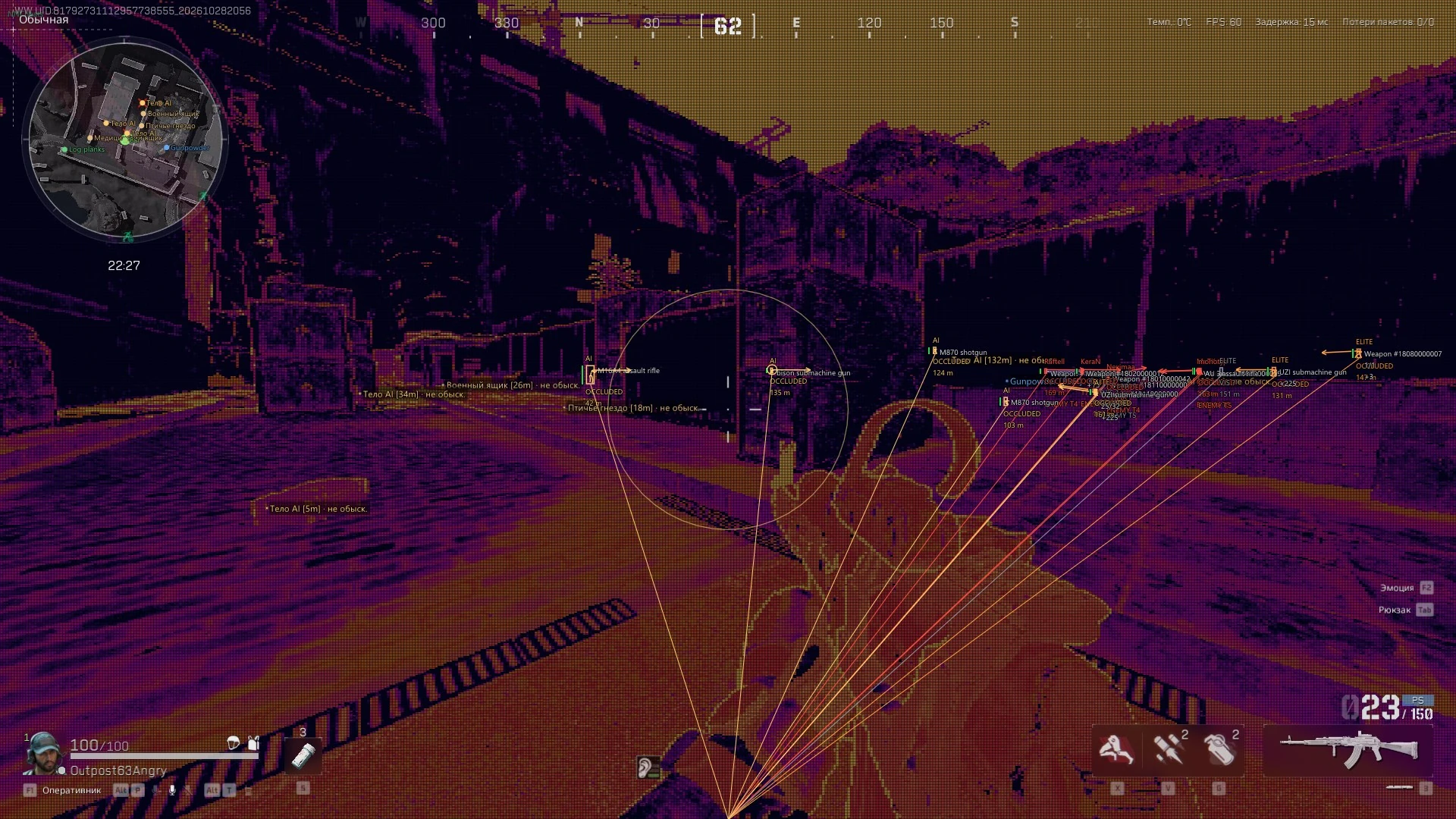
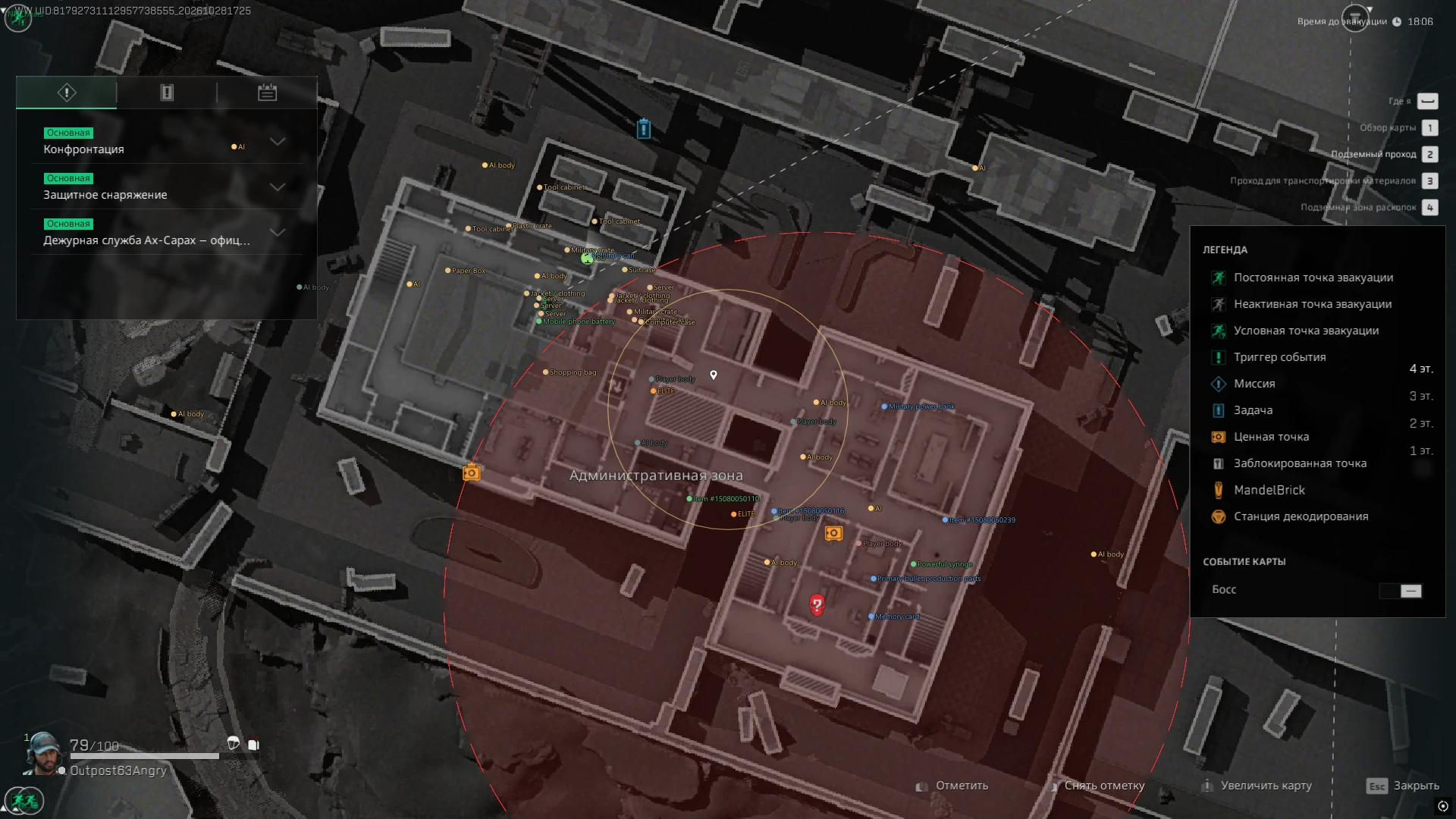
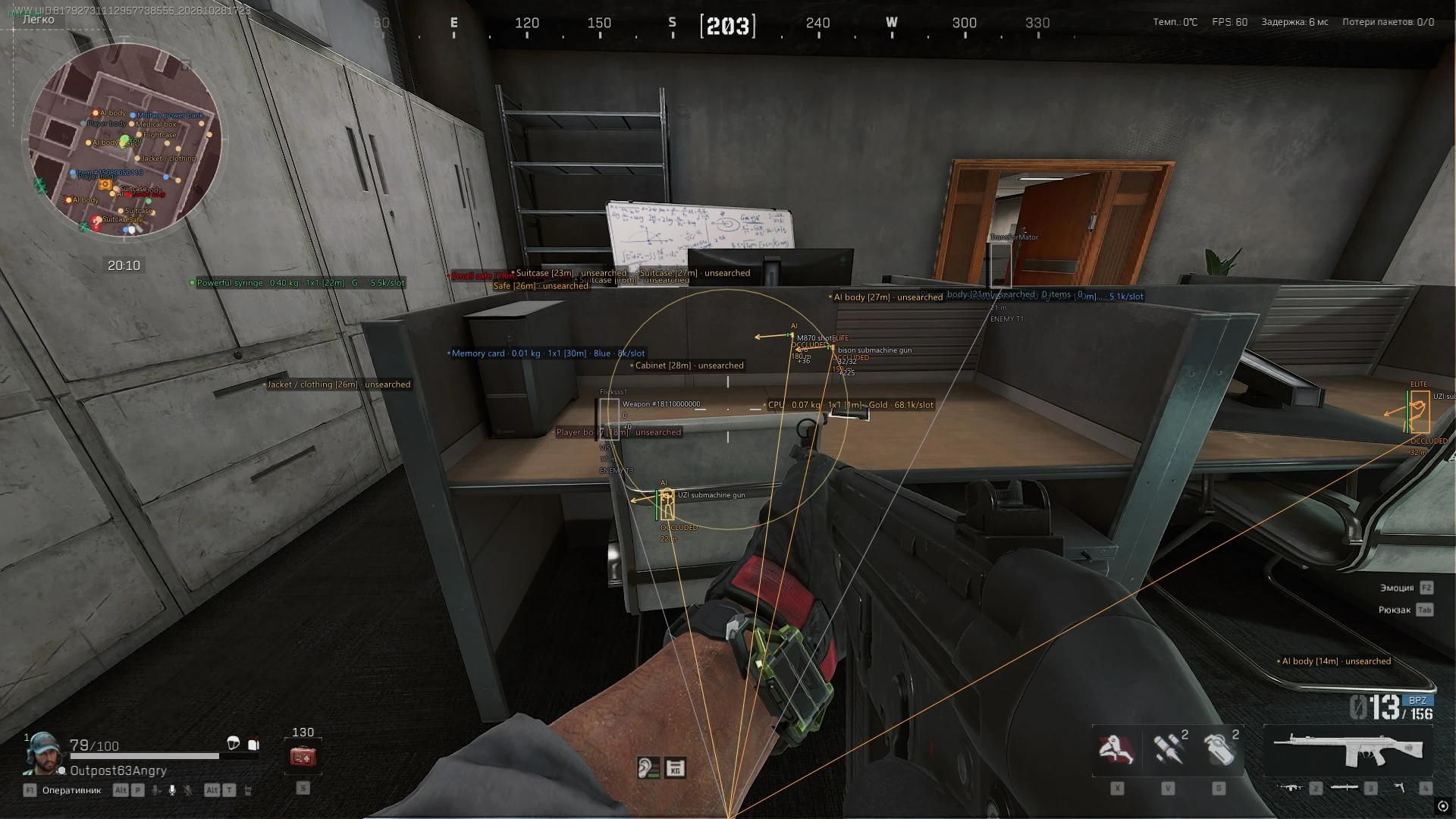
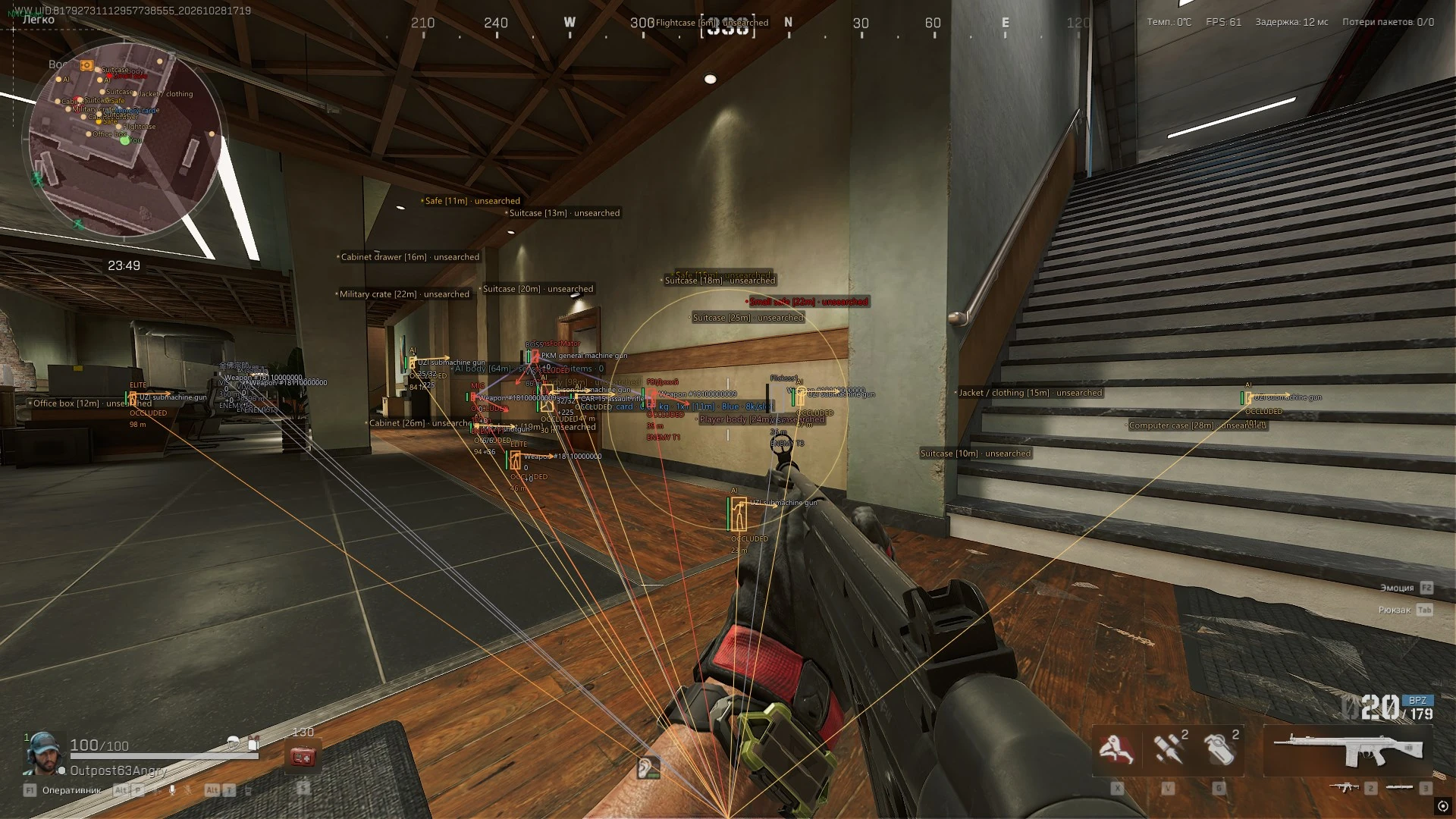
Player and loot ESP, Silent Aim, vector aim, map markers, highlights and thermal vision for Delta Force.
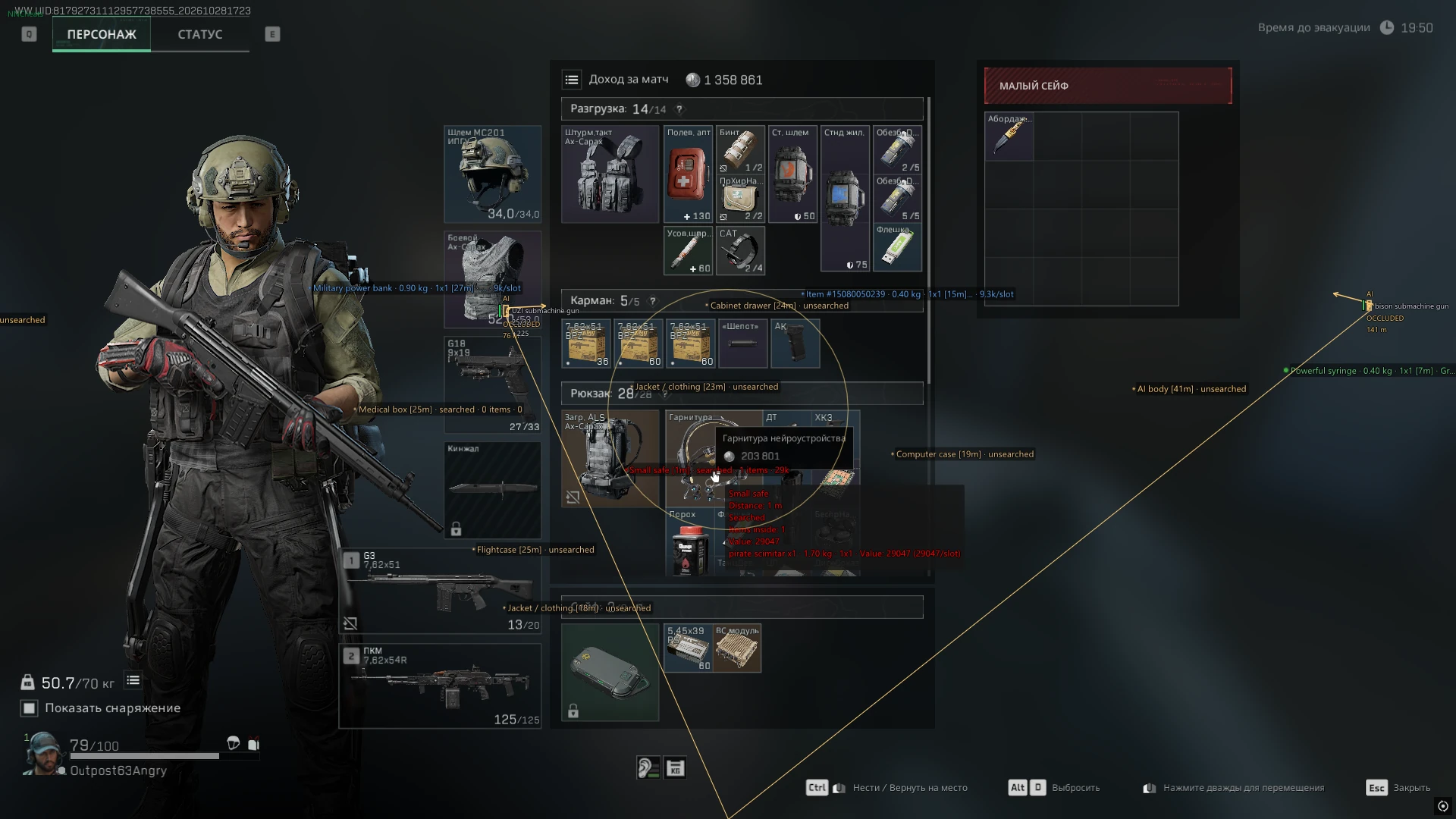
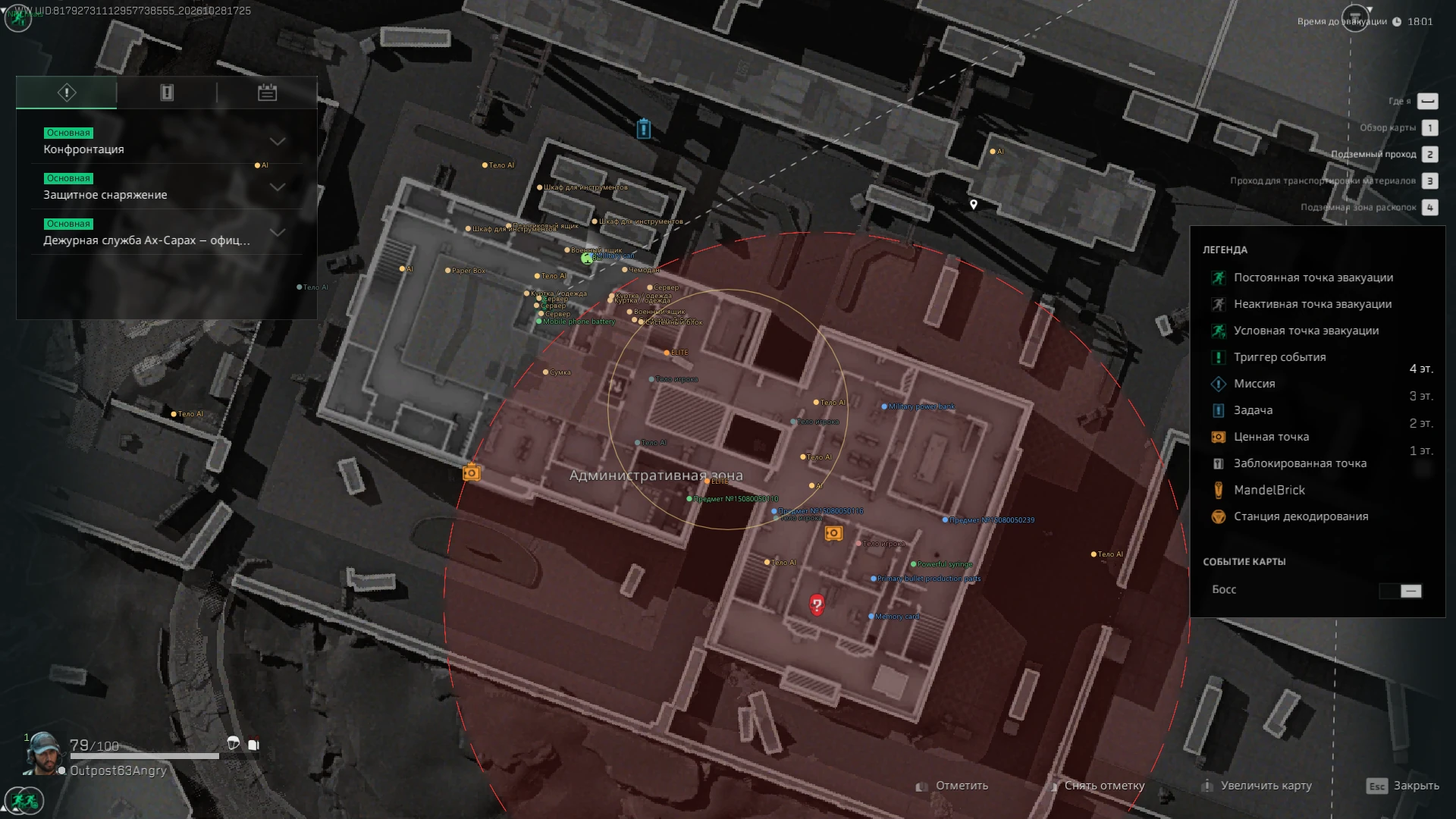
See players and their equipment, and find loot by name, rarity and price. Configure aiming, highlights, thermal vision and markers on both maps. Save your settings in profiles.
- Players and AI: health, equipment, visibility and teams
- Loot: search by name or ID, rarity and price filters, container contents
- Silent Aim, vector aim, highlights, thermal vision and radar
- 1 day
- 399 ₽
- 7 days
- 1500 ₽
- 30 days
- 3500 ₽
- Lifetime
- 40000 ₽
Lifetime benefits
- Priority technical support
- Early access to new products
- Up to 3 free one-day keys for each product, every month
Choose your duration on the payment page.
Aimbot
- Main
- Enable aim
- Aim point (Head/Chest/Pelvis)
- Aim at a visible body part
- Aim radius, °
- Aim distance, m
- Target priority (Closest to Crosshair/Nearest)
- Enemy players
- AI and bosses
- Stabilize target in always-on mode
- Use capsule if bones unavailable
- Target height adjustment, cm
- Enable aim
- Silent Aim
- Silent Aim
- Silent Aim activation (On Key/Always)
- Silent Aim key
- Bullet speed multiplier
- Distance before target, cm
- Silent Aim
- Vector Aim
- Vector aim
- Vector aim activation (On Key/Always)
- Vector aim key
- Vector aim response, ms (0 = instant)
- Can Run Alongside Silent Aim
- Shared Target and Aim Point Settings
- Vector aim
- Visual
- Aim circle
- Target marker
- Aim circle and target color
- Aim circle
Weapon Parameters
- Effect Controls
- Remove recoil
- Remove spread
- Remove camera recoil
- Remove camera sway
- Remove recoil
Visuals (Players and AI)
- Main
- Enable ESP
- Boxes
- Skeleton
- Names
- Character type
- Distance
- Snaplines
- Player distance, m
- AI distance, m
- Enable ESP
- Character Types
- Regular AI
- Elite AI
- Bosses
- Creatures
- NPCs
- Show dead players
- Regular AI
- Teams
- Team labels
- Show teammates
- Team colors
- Connect team members
- Team link thickness
- Team labels
- Health
- Health bar
- Health text
- Health bar width
- Show downed characters
- Downed health
- Health bar
- Equipment
- Weapon
- Magazine ammo
- Reserve ammo
- Ammo type
- Vest and durability
- Helmet and durability
- Reloading
- Weapon
- Label Placement
- Label format (Compact/One Detail per Line)
- Type, team and distance (Top/Bottom/Left/Right)
- Weapon and ammunition (Top/Bottom/Left/Right)
- Vest and helmet (Top/Bottom/Left/Right)
- Line spacing, px
- Label format (Compact/One Detail per Line)
- Appearance
- Smooth movement
- Smooth skeleton
- Text size
- Skeleton thickness
- Box style (Full/Corners)
- Box thickness
- Box fill opacity
- Line origin (Bottom/Center/Top)
- Line thickness
- Look direction
- Look arrow length
- Look arrow thickness
- Smooth movement
- Visibility
- Visibility check
- Hide occluded characters
- Visibility label
- Separate Color for Visible Skeleton Segments
- Aim at an Available Visible Body Part
- Visibility check
Game Effects
- Character Highlight
- Persistent character highlight
- Highlight teammates
- Highlight effect
- Persistent character highlight
- Highlight Presets (33)
- Motion sensor
- Recon arrow
- Medical gun
- Medical gun hit
- Support
- Downed enemy lock
- Breakthrough defender
- Reviving teammate
- Team medic
- Target locking
- Target locked
- Locked target fire
- Marker only
- Spectator: teammate
- Spectator: enemy
- Spectator: AI
- Spectator: free camera
- Spectator: attacker
- Spectator / replay
- Replay: self
- Replay: teammate
- Spectator: defender
- Spider ability
- Butterfly passive ability
- Overload
- Destroyed remote vehicle
- Counter-fire radar
- Sonar
- Remote vehicle detection
- High-value vehicle
- Flare detector
- Special loot
- Replay: friend
- Motion sensor
- Thermal Vision
- Persistent thermal vision
- Thermal effect
- Persistent thermal vision
- Thermal Modes
- Colored
- Monochrome
- Vehicle thermal
- Vehicle: EMP
- Colored
- Controls and Status
- Independent Highlight and Thermal Toggles
- Highlighted Character Count
- Effect Application Status
- Some Presets Depend on the Game Mode and Object Type
- Independent Highlight and Thermal Toggles
Radar and Maps
- Main
- Enable radar
- Radar coordinates (Around Player/In-game Maps)
- Minimap markers
- Radar labels
- Large Map Markers Follow Zoom and Pan
- Minimap Markers Follow Scale and Rotation
- Marker and Label Scale (0.5–3×, Shared by Both Maps)
- Enable radar
- Objects
- Players and bots
- Loot on radar
- Doors on radar
- Team Connections on the Map
- Players and bots
- Local Radar
- Radar size
- Local radar range, m
- Radar size
- Locked Doors
- Doors in world view
- Door marker distance, m
- Required Key Name
- Doors in world view
Visuals (Loot)
- Main
- Enable loot ESP
- Loot style (Classic/Panels)
- Items
- Crates and containers
- Bodies and backpacks
- Hide empty
- Hide searched
- Static containers
- Airdrops
- Hide opened containers
- Enable loot ESP
- Size and Distance
- Item distance, m
- Container distance, m (0 = items)
- Corpse distance (0 = global)
- Text size, px
- Marker size, px
- Maximum labels
- Label priority (Nearest/Rarity)
- Item distance, m
- Item Rarity
- White
- Green
- Blue
- Purple
- Gold
- Red
- Unknown rarity
- White
- Label Content
- Name
- Distance
- Rarity
- Quantity
- Body and container search state
- Contents count
- Show value
- Item durability
- Item weight
- Inventory dimensions
- Name
- Classic Style
- Maximum label width, px
- Compact Single-line Label
- Details on Hover
- Maximum label width, px
- Panels Style
- Avoid overlapping labels
- Loot world boxes
- Contents in label
- Items in label
- Background opacity
- Avoid overlapping labels
- Appearance
- Position marker
- Smooth markers
- Text outline
- Text shadow
- Label background
- Condition dot
- Loot opacity
- Position marker
- Container and Body Contents
- Inventory circle
- Tooltip max items
- Circle radius
- Circle visibility (Always/On Hover)
- Hide attachments in contents
- Inventory circle
Item Categories
- Main Categories
- Weapons
- Ammunition
- Armor
- Medical and repairs
- Valuables and materials
- Keys
- Equipment
- Other items
- Weapons
- Weapon and Equipment Types
- Rifles
- SMGs
- Pistols
- Snipers
- Shotguns
- LMGs
- Attachments
- Magazines
- Backpacks
- Rigs
- Marksman rifles
- Rifles
- Category Settings
- Item color source (By Rarity/By Category)
- Category filter (Hide Selected/Only Selected)
- Select Categories for Additional Filtering
- Separate Distance for Each Category
- Separate Color for Each Category
- Reset Category Distance to Global
- Item color source (By Rarity/By Category)
Containers
- Container Types
- Jacket / clothing
- Toolbox
- Tool cabinet
- Medical box
- Computer case
- Server
- Filing cabinet
- Cabinet drawer
- Small safe
- Safe
- Military crate
- Weapon crate
- Ammunition box
- Armor crate
- Supply crate
- Plastic crate
- Airdrop
- Cargo container
- Equipment bag
- Shopping bag
- Suitcase
- Dumpster
- Office box
- Bird nest
- Refrigerator
- Concrete mixer
- Vending machine
- Item pile
- Shell
- Toilet
- Lottery box
- Well lid
- Cabinet
- Other container
- Jacket / clothing
- Display Settings
- Colors by container type
- Find Container Type
- Enable All Types
- Disable All Types
- Separate Color for Each Type
- Separate Distance for Each Type
- Reset Type Distance to Global
- Colors by container type
Item Finder and Value
- Search
- Item finder
- Name or ID, comma separated
- Search mode (Highlight/Only Matches)
- Search radius, m
- Found items on radar
- Local radar size, px
- Selected Item List
- Clear Selected
- Wishlist
- Hide an Individual Item
- Search Result Pages
- Item finder
- Item Rules
- Add a Rule by Item ID
- Enable Rule
- Hide Item
- Notify on Item
- Custom or Inherited Color
- Value per Item
- Inventory Slot Count
- Note
- Delete Rule
- Add a Rule by Item ID
- Loot Value
- Price source (Catalog Price/Item Rule Values/In-game Guide Price)
- Price per slot
- Hide unknown values
- Minimum item value
- Valuable threshold
- Highly valuable threshold
- Minimum corpse value
- Minimum container value
- Promote medical items past value filters
- Promote weapons past value filters
- Promote backpacks past value filters
- Price source (Catalog Price/Item Rule Values/In-game Guide Price)
- Notifications
- Found item notifications
- Notify on wishlist
- Notify on rare items
- Notification rarity
- Notification cooldown, s
- Notify for item rules
- Found item notifications
Tracers and Diagnostics
- Tracers
- Own projectile trajectories
- Impact markers
- Lifetime, ms
- Tracer thickness
- Maximum tracers
- Tracer color
- Own projectile trajectories
- Shot Probes
- Log shot probes
- Capture native shot stages
- Log shot probes
Colors
- Characters and ESP
- Enemy players
- Allies
- Regular AI
- Elite AI
- Bosses
- Creatures
- NPCs
- Team links
- Dead players
- Health
- Low health
- Health text
- Visible enemy
- Downed character
- Doors requiring keys
- Enemy players
- Loot and Containers
- Loot: white
- Loot: green
- Loot: blue
- Loot: purple
- Loot: gold
- Loot: red
- Containers and bodies
- Player bodies / unknown type
- AI bodies
- Opened containers
- Static containers
- Airdrops
- Wishlist
- Search matches
- Inventory circle
- Label background
- Valuable items
- Highly valuable items
- Items of unknown rarity
- Loot: white
System
- Hotkeys
- Toggle menu
- Toggle ESP
- Toggle loot key
- Exit application
- Toggle menu
- Screen Capture
- Hide overlay and menu from capture (OBS)
- Hide overlay and menu from capture (OBS)
- Interface
- Russian and English Languages
- Settings Search (Ctrl+F)
- Jump to a Matching Setting
- Remaining Subscription Time
- ESP and Loot Preview
- NNCheats Label in the Top-left Corner
- Menu Hidden on Startup
- Russian and English Languages
Profiles
- Save
- Profile Name
- Save
- Profile Name
- Load
- Profile List
- Load
- Delete
- Refresh
- Profile List
- Reset
- Reset Everything
- Reset Everything
- Operating system
- Windows 10 / 11 (2004–25H2), x64 Official image only
- Processor
- Intel / AMD
- Graphics card
- Nvidia / AMD
- Game mode
- Borderless window
- Client
- Steam
- Included spoofer
- No
- Disk format
- GPT
- BIOS
- UEFI
- Information
- Hardware virtualization enabled Secure Boot and TPM disabled
What appears on the map?
Players, AI, loot and locked doors. Markers follow the zoom and position of the main map and the zoom and rotation of the minimap.
How do I find specific items?
Search by name or ID. Select categories and rarity, set a price threshold and save rules for individual items.
Can highlights and thermal vision run together?
They can be enabled independently. Some effects depend on the game mode and object type.
Can I save my settings?
Yes. Profiles, settings search and Russian and English interfaces are included.